How to Install:
Drop the folder into: steamapps/common/DRAGON BALL Sparking! ZERO/SparkingZERO/Mods
How to Use the Tool:
Scan Mods:
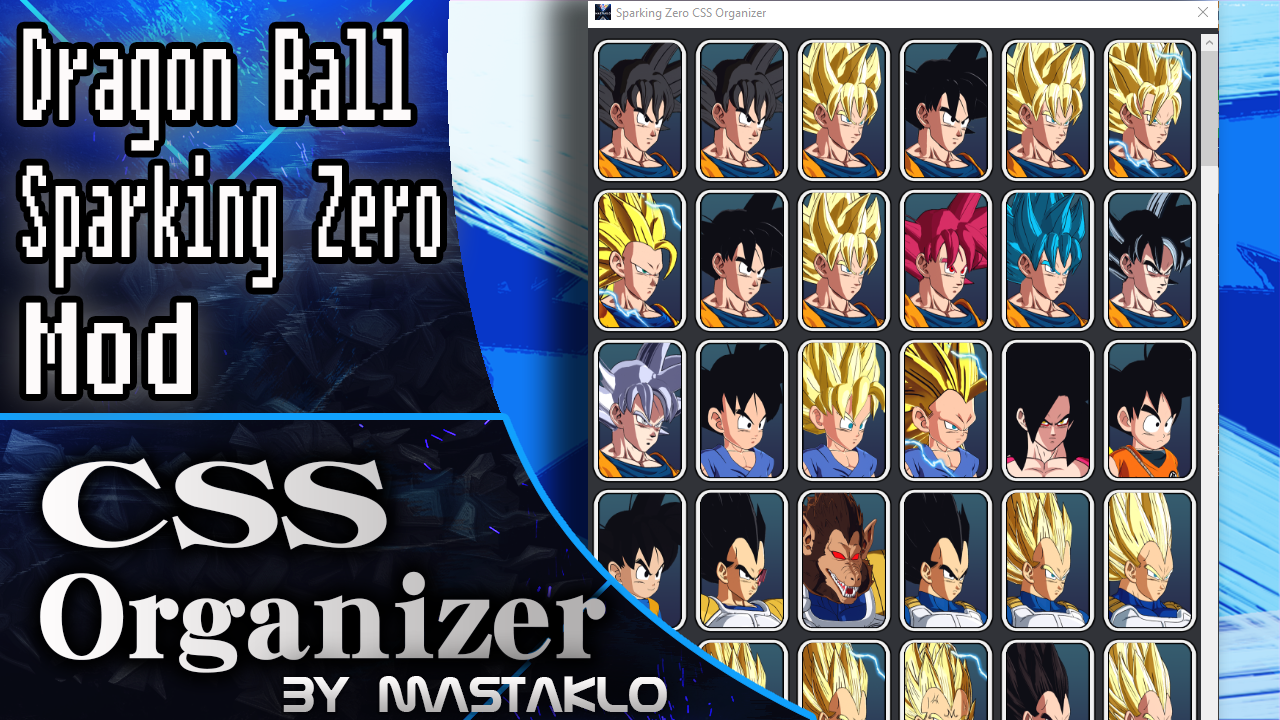
In the top-right corner of the tool, click the Scan Mods button. This will scan your current Mods workspace and automatically add all detected slots and icons. The first scan may take a little while. A cache file will be created afterward, so future scans will be much faster. If you download a new mod and place it in your Mods folder, simply click Scan Mods again. The tool will detect the new mod and add it automatically. By default, new mods will be placed in the position specified by the mod creator. In the settings, you can also choose to always add newly detected mods to the end of the list, making them easier to find.
Reordering Slots:
Simply drag and drop the slots to rearrange them. Your changes will be saved automatically. You can also select slots and move them all at once. If you want to move slots from the bottom to the top, you can put them in the temporary tray to navigate faster.
Hiding Slots:
To hide a slot, right-click it to open the edit window and select the option to hide. Hidden slots are moved to the Hidden Slots tab. This is useful for mod packs with multiple characters when you don’t want all of them to appear on your character select screen.
If you manually re-add that slot to the Normal and Chronological views, it will still be hidden in-game as long as it's present in the Hidden Slots tab. In the Hidden Slots tab, you can right-click a slot to bring up an edit window where you can unhide the slot and move it to the Normal View tab.
Edit Costumes:
If a character slot includes costumes, a costume icon will appear in the bottom-left corner of the slot. Clicking this icon will open the Costume Editor. In this window, you can simply drag the costume icons around to reorder them. You can also click the eye icon in the top-right corner of a costume slot to hide that costume in-game.
Sharing Your Edits With Others:
If you want to share your edits with others, just share the JSON folder, which you can find in: steamapps/common/DRAGON BALL Sparking! ZERO/SparkingZERO/Mods/Misc_CSSOrganizer_Mastaklo/Json/ Do not just upload the whole "Misc_CSSOrganizer_Mastaklo" folder, the tool, or the plugin itself. Doing so can cause file conflicts.
Outdated Notes from previeous versions:
The following notes are outdated methods from previous versions which i still included incase the scan mods fails for whatever reason
Adding New Slots:
To add new slots for mods or DLC characters, go to the Normal View tab and click the "+" icon at the end of the list. Enter the name and ID of the character you want to add. The name is only for display purposes in the tool and has no effect in-game. The new slot will also appear in the Chronological View tab.
You can also save your entire roster from the in-game menu. Press the "I" (i) key in-game to open the menu and press the "Save Full Roster" button. This will capture your current CSS order and save it in the config files. Old config files will be backed up in case something goes wrong. It will also dump every CSS icon to the images folder, so you don't have to manually add each slot.
Finding a Character's ID:
If you're unsure of a character's ID, press the "I" (i) key in-game to open the menu. Once the character appears on screen, click "Capture Actors" and select the correct entry from the dropdown menu.
Adding an Image to a Slot:
To assign an image to a slot, save an image file, name it with the same ID as the slot, and then place it in the "images" folder. This image is just to help visualize it in the tool and has no effect in-game. You can also dump an image of the currently selected actor by clicking the "Save Icon" button in the in-game menu. Clicking "Save Full Roster" will also dump every single icon.
Editing Slots:
If you make a mistake, you can right-click on a slot to edit its name or ID.
Notes on AI Usage:
AI was used to help with some functions of the GUI. The Blueprint mod is 100% Hand made.
4.1
Fixed an issue where the scanner incorrectly detected helper characters as separate slots.
Simply run Scan Mods again, and any previously added helper character slots will be automatically removed from the tool.
4.0
Thanks to Sinistros for commissioning this update.
Resizing the window now automatically adjusts the number of columns.
Added Scan Mods, which automatically scans your mods and adds their slots to the tool without having to launch the game.
Added Outfit Organizer, allowing you to reorder and hide outfit slots.
Modded slots are now labeled, making them easier to identify.
Hovering over a modded slot now shows which mod it belongs to.
3.0
GUI Overhaul.
Added checkboxes for bulk-moving slots.
Added a search function.
Added a temporary tray for easier slot movement over long distances.
2.9
Fixed yet another issue with the slot hiding feature. (This time for real)
2.8
Fixed the slot hiding feature. It now works for every slot, and unhiding no longer leaves you with a locked character.
Fixed the in-game menu not showing up when the Steam and game languages are different.
2.7
Reworked Ingame UI
Drop Down Box now directly shows the character name
Fixed an issue where only blank icons where dumped with the shallot update
2.6
Added Option to dump the current actors CSS Icon.
Added Full Icon dump to "Save Full Roster" Button
2.5
Fixed Save All config for the chrono view.
2.4
Added a new button to the in-game menu to dump the whole css to config.
That way you dont have to add each new slot manually in the organizer.
2.3
Added more checks to prevent characters to be permanently locked in your save file. Updating is highly recommended to prevent save file damages.
2.2
Made DLC Characters unable to be hidden. For some reason if you hide and then unhide dlc characters they stay locked in game even if you own the dlc. So to prevent that until a fix is found those wont be able to be hidden.
2.1
Fixed a issue where hidden slots stay locked after unhiding or uninstalling the organizer.
2.0
Added ability to edit the new chronological view.
Added ability to hide slots from the roster.
1.0.3
Fixed Metal Cooler and Super Garlic Jr. as i messed up theyr ids before.
1.0.2
Fixed yet another issue of some added slot mods not moving if reordered in the tool.
1.0.1
Fixed a issue of some added slot mods not moving if reordered in the tool.
1.0.0
Initial release
Download Info